To get a useful Fiverr Logo Maker draft, start with a short brief and a clear use for the logo. The workflow below helps you compare ideas, improve a promising design, and reach a deliberate stopping point before checkout.
Free Trials / Free preview and drafting · Updated October 11, 2026 · Fiverr Logo Maker
THE QUICK VERDICT
Decide what you need before browsing designs
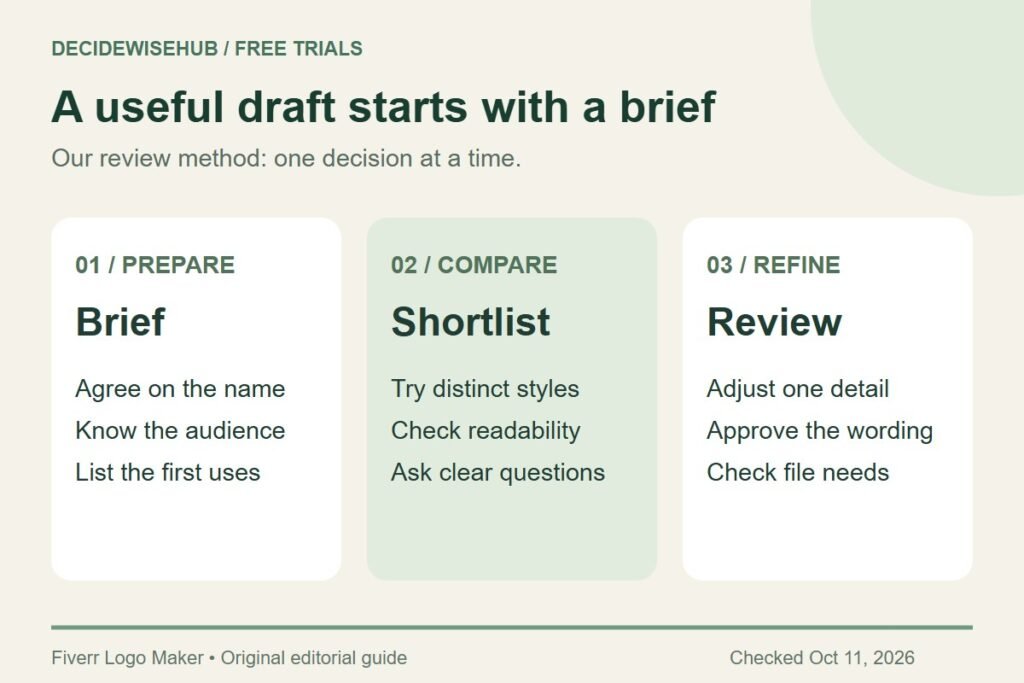
A clear name, audience, and first use make the editor more useful. Keep a small shortlist and change one feature at a time so you can tell what improved.
Explore the free logo preview →How we assessed this: Research-based guidance checked against Fiverr documentation. We have not completed a test purchase. Graphics are original editorial diagrams, not Fiverr screenshots. See our affiliate disclosure.
Prepare a five-line logo brief
Before opening the tool, write down your business name exactly as it should appear. Include punctuation and capitalization. If partners have not agreed on those details, treat the exercise as exploration and leave the purchase for later.
| Prompt | What to write |
|---|---|
| Name | The exact wording customers should see. |
| Audience | The people who need to recognize and trust the business. |
| First two uses | For example, a booking-page header and an invoice. |
| Desired impression | Two useful adjectives, such as calm and approachable. |
| Avoid | Anything misleading, cluttered, or too close to a competitor. |
Keep the description concrete. A business selling repair services needs a different first impression from a playful gift shop. Instead of asking for something that looks professional, decide what professional means to the customer: clear, careful, friendly, formal, energetic, or restrained.
If the slogan is unsettled, do not let it dominate the first version. Try to make the business name work on its own. You can assess whether extra wording earns its space once you have a promising direction.
Create and refine your draft
Open the official Logo Maker. Fiverr’s documented workflow moves from business name and optional slogan to industry and personality choices, then suggested designs, customization, and package selection. The following review method is our editorial guidance, not a record of a test purchase.
- Enter the agreed name. Use the version from your brief, not a temporary abbreviation.
- Choose relevant business details. Fiverr allows up to three industries and optional visual elements. Keep your answers tied to what you do.
- Set a coherent direction. Use the personality choices to express the impression you wrote down.
- Pick a small shortlist. Compare three genuinely different directions instead of three almost identical colors.
- Refine one option. Open customization and adjust the details that affect clarity.
- Pause for review. Approve the draft before moving to a package purchase.
Fiverr documents favorites and an option to edit your brief, so you can return to candidates or change the input when the selection misses the mark. Its workflow page also explains the customization and purchase steps.
Use a computer for customization: Fiverr says the editor is desktop-only, while mobile browsing is more limited. Saved favorites and drafts can be found under My logos. Source: Fiverr client guidance.
Change one thing, then judge the result
Begin with the text. Read the name out loud, then check it letter by letter. A decorative font may make two different letters look alike, and a cramped slogan can turn into a dark stripe when displayed small. The purpose is recognition, not showing how much you can fit into the design.
Next, assess the relationship between the symbol and the name. If the symbol gets all the attention, ask whether customers will remember the business wording. If the name is the strongest element, a simpler supporting mark may be enough.
Finally, adjust color. Keeping the layout stable while you compare colors makes it easier to see whether the new treatment helps. Changing the font, symbol size, background, and palette at once can leave you unsure which choice caused the improvement.
Fiverr provides short official tutorials for color, layout, font, name and slogan, shapes, background, favorites, and downloading. Use the relevant demonstration if a control is unfamiliar; interface labels can change.
A better feedback question
Ask: “What name do you read first, and what kind of business do you expect this to be?” Follow with: “Which part is hardest to read?” That produces a specific revision task instead of a collection of personal color preferences.
Worked example: a local repair business
Imagine a fictional bicycle repair shop preparing a booking page. Its priorities are a readable name, a calm appearance, and a shape that fits a horizontal header. This example illustrates a review process; it is not a claimed Fiverr-generated result.
The owner shortlists a badge, a large symbol with small text, and a simple horizontal arrangement. The badge looks appealing when large but squeezes the name. The oversized symbol has the same problem. The horizontal arrangement keeps the name clear, so the owner refines that option instead of adding more decorative details.
For the second pass, the owner compares a short slogan with no slogan. If the slogan does not add information the booking page already provides, removing it gives the business name more room. The next question is whether the design also works on an invoice, not whether it looks fashionable in isolation.
Your outcome may be different. A social-first project may place more weight on a compact composition. The value of the exercise is connecting a design choice to a real use, then recording why you preferred it.
Finish the review before paying
Write down the final name, selected direction, approved colors, and intended uses. Ask the person uploading your website or preparing your print job what file they need. This turns a vague request for the best package into a concrete requirements list.
Then compare our Fiverr Logo Maker packages guide. If you are unsure what a transparent PNG or SVG does, the download and file-format guide explains the difference. For the overall offer boundary, return to what Fiverr Logo Maker lets you do for free.
Frequently asked questions
Do I need a detailed AI prompt?
Focus on the structured brief and editing choices in Fiverr’s documented workflow. A long paragraph full of design adjectives is less useful than a settled name, a clear audience, and a practical use.
What if none of the options feels right?
Revisit your requirements. Decide whether the problem is the general direction, a particular detail, or a need for bespoke artwork. Do not buy a near-match simply because you have already spent time browsing.
How many drafts should I compare?
Three distinct candidates are a manageable starting point for this method. That is an editorial suggestion, not a Fiverr limit. Add another only if it answers a question the shortlist does not resolve.
When is a draft ready?
When the wording is approved, the design serves the first uses on your list, and you know what you need to download. If any of those remains uncertain, keep the decision open.
Our recommendation
Use one brief and a small shortlist. Refine readability before decoration, gather specific feedback, and finish the file-requirements check before choosing a package.
Sources and offer checks
- Fiverr: how Logo Maker works
- Fiverr: editor video tutorials
- Fiverr Help Center: client workflow, files, revisions, and license limits
Sources reviewed October 11, 2026. Confirm the current package, file contents, usage terms, currency, and checkout total before purchasing.